




Wi-Fi has become one of the most important technologies in modern life. From smartphones and laptops to smart TVs, security cameras, gaming consoles, and smart home devices, countless devices use Wi-Fi to connect to the internet and communicate with each other. Whether you are working from home, watching videos, playing online games, attending a virtual meeting, or simply browsing the web, Wi-Fi is often working quietly in the background.
But what exactly is Wi-Fi, and how does it work? Wi-Fi allows electronic devices to exchange data wirelessly using radio signals. Instead of requiring a physical Ethernet cable between every device and a network, Wi-Fi provides a convenient wireless connection within a certain area.
Understanding Wi-Fi is useful for beginners as well as anyone who wants to improve their home or office network. In this guide, we will explain what Wi-Fi is, how wireless networking works, the role of routers and access points, Wi-Fi frequencies and standards, security, speed, range, common problems, and practical ways to improve Wi-Fi performance.
What Is Wi-Fi?
Wi-Fi is a wireless networking technology that allows compatible electronic devices to connect to a local network and communicate using radio waves. The term is commonly associated with wireless internet access, although Wi-Fi itself and the internet are not the same thing.
For example, when your smartphone connects to your home Wi-Fi, it first connects wirelessly to your router. The router may then connect to your internet service provider through a wired connection. The router acts as a bridge between your local wireless network and the wider internet.
Wi-Fi is based on technical standards developed for wireless local area networking. Modern Wi-Fi technology is designed to provide increasingly faster speeds, better efficiency, improved reliability, and support for large numbers of connected devices.
Almost any modern device can include Wi-Fi capabilities, including:
- Smartphones
- Tablets
- Laptops
- Desktop computers
- Smart TVs
- Streaming devices
- Wireless printers
- Smart speakers
- Security cameras
- Smart appliances
- Gaming consoles
- Wearable devices
- Internet of Things devices
Wi-Fi vs Internet: What Is the Difference?
One of the most common misunderstandings is that Wi-Fi and the internet are the same thing. They are not.
Wi-Fi is a wireless networking method. It allows devices to connect to a local network without using a physical network cable.
The internet is a worldwide network of interconnected computer networks and services.
A Wi-Fi network can exist without an internet connection. For example, two computers connected to the same Wi-Fi router can potentially communicate with each other even if the router has no internet service.
Similarly, you can have an internet connection without Wi-Fi. A computer connected directly to a router using an Ethernet cable can access the internet without using wireless networking.
In a typical home, Wi-Fi provides the wireless connection between devices and the router, while the router provides access to the internet through an ISP.
How Does Wi-Fi Work?
Wi-Fi works by transmitting data through radio waves rather than physical cables.
When you connect your smartphone to a Wi-Fi network, the device’s wireless adapter communicates with a wireless router or access point. Data is converted into radio signals, transmitted through the air, received by the other device, and converted back into digital information.
The basic process looks like this:
Device → Wi-Fi radio signal → Router → Internet → Router → Wi-Fi radio signal → Device
Suppose you open a website on your laptop. Your laptop sends a request through its Wi-Fi connection to the router. The router forwards that request toward the internet through your internet connection. Information from the website travels back to the router, which sends it wirelessly to your laptop.
This exchange happens extremely quickly, making the process appear almost instantaneous.
The Role of Radio Waves in Wi-Fi
Wi-Fi uses radio waves to transmit information through the air. Radio waves are a type of electromagnetic radiation that can carry information over distances.
A Wi-Fi device contains a wireless radio and antenna. The radio converts digital data into signals that can be transmitted through the antenna.
At the receiving end, another antenna captures the radio signal. The receiving radio processes the signal and converts it back into digital information.
This is similar to how other wireless technologies operate, but Wi-Fi uses specific frequency ranges, communication techniques, and networking standards designed for local wireless communication.
What Is a Wi-Fi Router?
A Wi-Fi router is one of the most important devices in a typical wireless network.
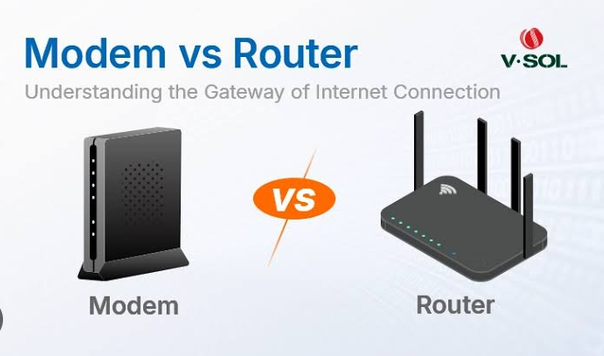
A modern router often performs several jobs at the same time. It can provide Wi-Fi connectivity, connect your home network to the internet, assign IP addresses to devices, manage network traffic, and provide security features.
For example, imagine a home with a smartphone, laptop, smart TV, and gaming console. These devices can connect to the router wirelessly. The router manages communication between the devices and the internet.
Many routers also include Ethernet ports, allowing wired devices to connect to the same network.
What Is a Wireless Access Point?
A wireless access point, often called an AP, is a device that provides Wi-Fi connectivity to wireless devices.
Routers designed for homes commonly include an access point inside them. In larger offices, schools, hotels, and campuses, multiple separate access points may be installed throughout the building.
An access point connects wireless devices to a wired network. Multiple access points can work together to provide Wi-Fi coverage across a large area.
For example, a large office might have access points on different floors. Employees can move around the building while remaining connected to the organization’s wireless network.
Understanding SSID
When you search for available Wi-Fi networks on your phone or laptop, you see names such as “Home WiFi,” “Office Network,” or another customized name.
This network name is called the SSID, or Service Set Identifier.
The SSID helps users identify a particular wireless network. A router normally broadcasts its SSID so nearby devices can detect it.
Users select the desired SSID and enter the appropriate password to connect.
Network administrators can configure SSIDs according to their needs. For example, a business might have separate networks for employees, guests, and IoT devices.
Wi-Fi Frequency Bands
Wi-Fi can operate across different radio frequency bands. The most common bands in modern networks include 2.4 GHz, 5 GHz, and 6 GHz.
Each band has different characteristics.
2.4 GHz
The 2.4 GHz band generally provides better coverage and can travel through walls more effectively than higher-frequency bands.
However, it can become crowded because many devices use this frequency range. Bluetooth devices, older wireless equipment, and other sources of interference can affect performance.
The 2.4 GHz band is often useful when range is more important than maximum speed.
5 GHz
The 5 GHz band generally offers higher performance and access to more channels than 2.4 GHz.
It is often better for activities such as:
- HD and 4K streaming
- Online gaming
- Large file transfers
- Video conferencing
- High-speed downloads
However, 5 GHz signals typically have shorter effective range and have more difficulty passing through walls than 2.4 GHz signals.
6 GHz
Newer Wi-Fi generations can also use the 6 GHz band. It provides additional spectrum and can offer access to less congested channels.
The 6 GHz band can be particularly useful in environments with many wireless networks and devices. However, compatible devices are required, and coverage characteristics differ from lower-frequency bands.
What Are Wi-Fi Standards?
Wi-Fi technology has evolved significantly over the years. Different generations have introduced improvements in speed, capacity, efficiency, and reliability.
Some commonly recognized Wi-Fi generations include:
- Wi-Fi 4
- Wi-Fi 5
- Wi-Fi 6
- Wi-Fi 6E
- Wi-Fi 7
Wi-Fi 4 is associated with the 802.11n standard, while Wi-Fi 5 corresponds to 802.11ac. Wi-Fi 6 is associated with 802.11ax, and Wi-Fi 6E extends Wi-Fi 6 capabilities into the 6 GHz band.
Wi-Fi 7 is a newer generation designed to provide greater throughput, lower latency, and improved performance in demanding wireless environments.
Newer generations do not simply mean faster maximum speeds. They also introduce technologies intended to make networks work more efficiently when many devices are connected simultaneously.
How Does a Wi-Fi Connection Transfer Data?
Digital information is divided into smaller units of data for transmission across a network.
When you download a file, for example, the information is transmitted through many packets. Wi-Fi carries these packets between your device and the access point or router.
The wireless system uses sophisticated methods to encode information into radio signals. It also monitors the quality of communication and can adjust transmission behavior when conditions change.
If interference increases or the signal becomes weaker, the connection may reduce its transmission rate to maintain reliability.
This is one reason why the speed displayed by a device may change depending on distance, obstacles, interference, and network conditions.
What Determines Wi-Fi Speed?
Many people assume that buying a router with a high advertised speed automatically makes their internet faster. In reality, Wi-Fi performance depends on many factors.
Important factors include:
Internet Connection Speed
Your Wi-Fi network cannot provide internet speeds beyond what your internet connection and network equipment can effectively deliver.
For example, if your internet plan provides 100 Mbps, upgrading to a much faster Wi-Fi router will not automatically give you a 1 Gbps internet connection.
Router Capability
Older routers may support fewer wireless technologies and lower maximum speeds than modern models.
Device Capability
Your smartphone, laptop, or other device also needs to support the relevant Wi-Fi generation and features.
Distance
Wi-Fi signals generally become weaker as the distance between the device and access point increases.
Obstacles
Walls, floors, furniture, metal objects, and other materials can weaken wireless signals.
Interference
Nearby wireless networks and other electronic equipment can interfere with Wi-Fi communication.
Number of Devices
A network with many active devices can experience increased competition for wireless capacity.
Wi-Fi Range
Wi-Fi range is not a fixed number. It depends on the router, frequency band, antenna design, building materials, interference, device capabilities, and environmental conditions.
A router may provide strong connectivity in the same room but significantly weaker connectivity several rooms away.
The 2.4 GHz band generally travels farther than 5 GHz, while 6 GHz typically provides shorter coverage under comparable conditions.
For larger homes or buildings, additional access points or mesh Wi-Fi systems can help extend coverage.
What Is Mesh Wi-Fi?
Mesh Wi-Fi is a wireless networking system designed to provide broader and more consistent coverage.
Instead of relying on one router to cover an entire building, a mesh system uses multiple nodes or access points.
One unit normally connects to the internet connection, while additional units are placed in other areas of the building. These units communicate with each other and help provide Wi-Fi coverage throughout the property.
Mesh Wi-Fi can be especially useful in:
- Large houses
- Multi-story buildings
- Offices
- Homes with thick walls
- Areas with Wi-Fi dead zones
The main advantage is improved coverage. However, the actual performance depends on the quality and placement of the mesh nodes and whether they communicate wirelessly or through Ethernet.
Wi-Fi Security
Wireless networks need security because radio signals travel through the air. Without proper protection, unauthorized users may attempt to access a network.
Modern Wi-Fi networks can use security technologies such as WPA2 and WPA3.
A strong Wi-Fi password is also important. A good password should be long, unique, and difficult to guess.
You should avoid simple passwords based on names, phone numbers, birthdays, or common words.
Other useful security practices include:
- Keep router firmware updated.
- Use modern wireless security settings.
- Change default administrator credentials.
- Disable unnecessary router features.
- Create a separate guest network for visitors.
- Avoid using outdated security protocols.
- Monitor unfamiliar devices connected to the network.
Why Does Wi-Fi Become Slow?
Slow Wi-Fi can have many causes.
One common cause is distance. A device located far away from the router may receive a weaker signal.
Another issue is network congestion. If many devices are actively downloading, streaming, gaming, or uploading data simultaneously, available wireless capacity can become limited.
Interference is another common problem. Nearby wireless networks may compete for the same channels.
Older hardware can also limit performance.
Sometimes the Wi-Fi network itself is working correctly but the internet connection is slow. Restarting the router, checking the connection speed, and testing another device can help identify the source of the problem.
Common Wi-Fi Problems
Weak Signal
A weak signal can cause slow speeds, disconnections, and high latency. Moving closer to the router or improving access point placement can help.
Frequent Disconnections
Frequent disconnects may result from interference, outdated firmware, hardware problems, or poor signal quality.
Slow Internet
Slow internet may be caused by the ISP, router, network congestion, or Wi-Fi conditions.
Limited Coverage
Large buildings may require additional access points or a mesh Wi-Fi system.
Too Many Connected Devices
A large number of active devices can increase network congestion and reduce available bandwidth.
How to Improve Wi-Fi Performance
There are several practical ways to improve a wireless network.
Place the Router in a Good Location
Avoid hiding the router inside cabinets or placing it behind large objects. A relatively central and elevated location can often provide better coverage.
Keep the Router Away From Interference
Avoid placing the router close to equipment or objects that may interfere with wireless signals.
Use the Appropriate Frequency
Use 2.4 GHz when greater range is important and 5 GHz or 6 GHz when compatible devices are nearby and higher performance is needed.
Update Router Firmware
Manufacturers regularly release firmware updates that can improve performance, security, and stability.
Reduce Unnecessary Network Traffic
Pause unnecessary downloads, cloud synchronization, or other bandwidth-heavy activities when maximum performance is required.
Consider Mesh Wi-Fi
If a single router cannot provide adequate coverage, a properly configured mesh system can improve coverage.
Wi-Fi and Mobile Data Are Different
Wi-Fi and cellular mobile data both provide wireless connectivity, but they use different network infrastructures.
Wi-Fi normally connects a device to a local wireless network through a router or access point.
Mobile data connects a smartphone or other cellular device to a cellular network operated by a mobile carrier.
For example, when you connect your phone to your home Wi-Fi, your data usually travels through your home router and fixed internet connection. When you turn off Wi-Fi and use mobile data, the phone communicates with a nearby cellular tower instead.
Wi-Fi in Smart Homes
Wi-Fi is an important part of the modern smart home.
Many smart devices can connect to Wi-Fi, including:
- Smart lights
- Smart thermostats
- Security cameras
- Smart doorbells
- Smart speakers
- Smart TVs
- Home appliances
- Robot vacuum cleaners
These devices can communicate with cloud services, smartphones, or other devices on the local network.
As the number of smart devices increases, having a reliable and secure wireless network becomes increasingly important.
Wi-Fi for Gaming and Streaming
Wi-Fi can support demanding activities such as online gaming and high-resolution video streaming when the network is properly configured.
For gaming, latency and stability can be more important than raw download speed. A fast connection with frequent interruptions can still produce a poor gaming experience.
For streaming, sufficient bandwidth and consistent connectivity are important.
If possible, connecting a gaming PC, console, or streaming device directly to the router through Ethernet can provide a more stable connection. However, modern Wi-Fi can also work very well when wired connectivity is inconvenient.
Wi-Fi in Businesses
Businesses use Wi-Fi for many different purposes. Employees may connect laptops, smartphones, tablets, printers, scanners, and specialized equipment.
Business networks often require more advanced features than home networks. These can include multiple access points, separate guest networks, centralized management, stronger authentication, traffic management, and network monitoring.
Proper access point placement is particularly important in offices because walls, floors, meeting rooms, and large numbers of users can affect wireless performance.
The Future of Wi-Fi
Wi-Fi continues to evolve as people connect more devices and demand higher performance.
Newer generations focus not only on maximum speed but also on efficiency, lower latency, reliability, and better performance in environments containing many connected devices.
Future wireless networks will likely play an even larger role in smart homes, businesses, augmented and virtual reality, cloud applications, connected vehicles, industrial systems, and Internet of Things devices.
As wireless technology improves, users will increasingly expect reliable connectivity throughout homes, offices, public spaces, and other environments.
Frequently Asked Questions About Wi-Fi
Is Wi-Fi the same as the internet?
No. Wi-Fi is a wireless networking technology used to connect devices to a local network. The internet is a worldwide network of interconnected systems. Wi-Fi is commonly used to access the internet, but the two are different.
Does Wi-Fi work without internet?
Yes. Devices can communicate over a local Wi-Fi network even when the internet connection is unavailable, depending on the network configuration.
Is 5 GHz Wi-Fi faster than 2.4 GHz?
5 GHz can generally provide higher wireless performance under suitable conditions, while 2.4 GHz generally provides better range and wall penetration.
Does Wi-Fi use radio waves?
Yes. Wi-Fi communicates using radio-frequency signals to transmit data wirelessly.
Can Wi-Fi go through walls?
Yes, Wi-Fi signals can pass through walls, but walls and other obstacles weaken the signal. The amount of signal loss depends on the material and construction.
How can I increase Wi-Fi range?
You can improve coverage by placing the router in a better location, using additional access points, installing a mesh Wi-Fi system, or using appropriate network equipment.
Is Wi-Fi secure?
Wi-Fi can be secure when modern security protocols, strong passwords, updated firmware, and appropriate network configurations are used. Older security methods should generally be avoided.
Conclusion
Wi-Fi is a wireless networking technology that allows electronic devices to communicate without physical network cables. It uses radio signals to transfer data between devices and wireless access points or routers.
Although Wi-Fi is often associated with internet access, it is actually the wireless connection that links devices to a local network. The router can then provide access to the internet through an ISP.
Understanding the basics of Wi-Fi can help you choose better networking equipment, troubleshoot connection problems, improve wireless coverage, and protect your network from unauthorized access.