






Buying a new smartphone can be confusing because there are hundreds of models available at different prices, and each phone offers a different combination of features. Some smartphones focus on camera quality, while others prioritize gaming performance, battery life, display quality, software, or affordability.
The most expensive smartphone is not always the best choice for every person. The right smartphone depends on your budget, daily activities, preferred features, and how long you plan to use the device.
This complete smartphone buying guide explains the most important factors to consider before purchasing a new phone. From performance and cameras to battery life, display, storage, software, and build quality, these tips can help you choose a smartphone that provides good value for your money.
1. Start With Your Budget
The first step when choosing a smartphone is deciding how much you are comfortable spending. Having a clear budget makes it easier to narrow down your options.
Smartphones can generally be divided into several price categories:
- Budget smartphones: Designed for basic tasks such as calls, messaging, browsing, social media, and video streaming.
- Mid-range smartphones: Offer stronger processors, better displays, improved cameras, and additional features.
- Premium mid-range phones: Provide many flagship-like features at a lower price.
- Flagship smartphones: Usually offer the best processors, cameras, displays, materials, software features, and long-term support.
You should not spend extra money simply because a phone has a higher price. Instead, identify the features that matter most to you.
For example, someone who mainly uses WhatsApp, YouTube, Facebook, and web browsing may not need an expensive flagship. On the other hand, a professional photographer, mobile gamer, or content creator may benefit from spending more on performance and camera capabilities.
2. Choose the Right Operating System
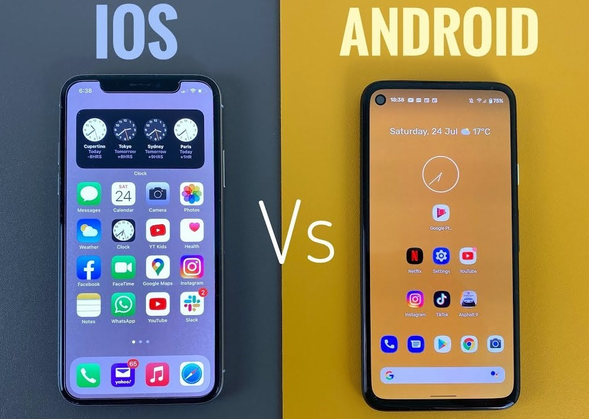
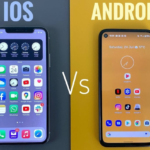
The operating system is one of the most important decisions when purchasing a smartphone. The two major smartphone platforms are Android and iOS.
Android
Android smartphones are available from many manufacturers and come in a wide range of prices. This gives buyers more choices in terms of hardware, design, specifications, and features.
Android can be a good choice if you want:
- More hardware options
- Different price ranges
- Greater customization
- Expandable storage on selected models
- More variety in designs and features
- More flexibility with apps and settings
iOS
iPhones use Apple’s iOS operating system. iOS is known for its simple interface, strong integration with other Apple products, and long-term software support.
An iPhone may be suitable if you want:
- A consistent software experience
- Strong integration with Apple devices
- Long-term software updates
- High-quality video recording
- A large selection of optimized apps
- A simple and familiar interface
Neither operating system is automatically better for everyone. Your choice should depend on your preferences and the devices you already use.
3. Consider the Processor and Performance
The processor, often called the chipset or system-on-chip, controls much of a smartphone’s performance.
A powerful processor helps with demanding activities such as gaming, video editing, multitasking, photography processing, and running advanced applications.
When comparing smartphones, do not look only at the processor’s name. Consider its generation, performance class, efficiency, and how it performs in real-world use.
For Basic Users
If you mainly use messaging apps, social media, browsing, email, and video streaming, a modern entry-level or mid-range processor should usually be sufficient.
For Heavy Users
If you frequently play demanding games, edit videos, use multiple applications simultaneously, or perform other intensive tasks, look for a stronger mid-range or flagship processor.
For Gamers
Mobile gamers should pay particular attention to:
- CPU performance
- GPU performance
- Cooling system
- Display refresh rate
- Touch response
- Battery capacity
- Sustained performance
A phone that performs well for a few minutes but becomes significantly slower after heating up may not be ideal for long gaming sessions.
4. Check the RAM
RAM helps a smartphone handle multiple applications and tasks simultaneously.
A phone with more RAM can generally keep more applications active in the background, although RAM alone does not determine performance.
For basic users, moderate RAM can be enough. Mid-range and premium phones often provide more RAM for multitasking, while high-end models may offer even larger configurations.
However, do not choose a phone simply because it advertises a very large RAM number. Software optimization and processor performance are also important.
A well-optimized smartphone with moderate RAM can sometimes provide a better experience than a poorly optimized device with more RAM.
5. Choose the Right Storage Capacity
Storage determines how many apps, photos, videos, games, documents, and other files you can keep on your phone.
Common storage options include:
- 64GB
- 128GB
- 256GB
- 512GB
- 1TB on some premium models
For many users, 128GB can provide a reasonable starting point. However, people who take many photos and videos, download large games, or store movies and other files may want 256GB or more.
Also check whether the smartphone supports a microSD card. Some Android smartphones provide expandable storage, while many premium devices do not.
If you plan to keep your smartphone for several years, choosing more internal storage can be a smart decision.
6. Pay Attention to Display Quality
You interact with your smartphone through its display, so screen quality can significantly affect your everyday experience.
Important display specifications include:
- Screen size
- Resolution
- Panel technology
- Refresh rate
- Brightness
- Color accuracy
- HDR support
- Touch responsiveness
AMOLED vs LCD
AMOLED displays generally provide deep blacks, strong contrast, and vibrant colors. They are common in mid-range and premium smartphones.
LCD displays can still provide good image quality and may help manufacturers keep phone prices lower.
Refresh Rate
A higher refresh rate can make scrolling, animations, and supported games feel smoother.
Many modern smartphones offer refresh rates higher than traditional 60Hz displays. However, higher refresh rates can consume more power depending on the device and software.
Brightness
If you frequently use your phone outdoors, maximum brightness is particularly important. A display that looks excellent indoors may be difficult to see under strong sunlight.
7. Evaluate Camera Quality Carefully
Camera specifications are among the most heavily marketed smartphone features, but megapixels are not the only factor that determines image quality.
When evaluating cameras, consider:
- Main camera sensor
- Image processing
- Optical image stabilization
- Ultrawide camera
- Telephoto camera
- Low-light performance
- Portrait photography
- Video recording
- Front camera quality
A phone with a high-megapixel camera does not automatically produce better photos than a phone with fewer megapixels.
Software processing, sensor quality, lens quality, stabilization, and overall camera tuning can have a major impact on results.
Main Camera
The main camera is usually the most important camera because it is used for everyday photography.
Ultrawide Camera
An ultrawide camera is useful for landscapes, architecture, group photos, and situations where you want to capture more of a scene.
Telephoto Camera
A telephoto camera provides optical zoom and can be especially useful for portraits and distant subjects.
Video Recording
If you create content for YouTube, TikTok, Instagram, or other platforms, pay attention to video stabilization, resolution, frame rates, microphone quality, and autofocus.
8. Check Battery Capacity and Battery Life
Battery life is another major consideration.
Battery capacity is usually measured in milliamp-hours, or mAh. However, a larger battery does not always guarantee longer battery life.
Battery performance depends on:
- Processor efficiency
- Display technology
- Screen brightness
- Refresh rate
- Software optimization
- Network usage
- Application activity
- Battery capacity
Instead of looking only at the battery size, look for real-world battery-life testing when possible.
If you regularly travel, work away from charging points, or use navigation and mobile data throughout the day, prioritize a phone with strong battery endurance.
9. Consider Charging Speed
Fast charging can be extremely convenient. A smartphone with fast charging can add significant battery power during a short break.
However, charging speed should not be the only consideration.
Look at:
- Wired charging speed
- Wireless charging support
- Charger availability
- Charging compatibility
- Battery health features
Some smartphones include fast chargers, while others require you to purchase a compatible charger separately.
Wireless charging can also be useful if you prefer a cable-free charging setup.
10. Look at Build Quality and Design
The design of a smartphone is not only about appearance. Build quality can affect durability and comfort.
Consider:
- Frame material
- Back material
- Screen protection
- Water and dust resistance
- Weight
- Thickness
- Grip
- Button placement
A premium metal or glass design may look attractive, but it can also be more vulnerable to scratches or accidental drops.
If durability is your priority, consider using a protective case and screen protector regardless of how strong the phone is advertised to be.
11. Check Water and Dust Resistance
Water and dust resistance can provide additional protection against everyday accidents.
Some smartphones have official resistance ratings that indicate their protection against dust and water under specified testing conditions.
However, water resistance does not mean a phone is completely waterproof. Protection can also decrease over time because of wear, drops, repairs, or damage to seals.
If you frequently work outdoors, travel, or use your phone near water, water and dust resistance can be a valuable feature.
12. Think About Software Updates
Software support is one of the most important factors for long-term smartphone ownership.
A smartphone may have excellent hardware, but limited software support can make it less attractive over several years.
Before buying a phone, check:
- How many major operating system updates are promised
- How long security updates are provided
- How frequently updates are released
- Whether the manufacturer has a good update history
Long software support can improve security, compatibility, and the useful life of your smartphone.
If you plan to keep your phone for four or five years, software support should be a major part of your decision.
13. Consider 5G and Network Compatibility
If you plan to use your smartphone for several years, network compatibility is important.
Many modern smartphones support 5G, but the exact supported bands can vary between models and regions.
Before buying an imported smartphone, make sure it supports the network bands used by your local mobile operators.
Also check:
- 4G compatibility
- 5G compatibility
- SIM configuration
- eSIM support
- Wi-Fi standards
- Bluetooth version
Network compatibility is especially important when purchasing phones from international markets.
14. Check SIM and eSIM Features
Depending on your needs, you may want dual-SIM support.
Dual-SIM functionality can be useful if you maintain separate personal and business numbers or regularly use two mobile networks.
Some phones use physical SIM cards, while others support eSIM technology.
Before purchasing, confirm the exact SIM configuration of the regional model you are considering.
15. Think About Audio and Speakers
Smartphone audio quality is easy to overlook.
If you frequently watch videos, listen to music, play games, or make video calls without headphones, speaker quality can make a noticeable difference.
Look for:
- Stereo speakers
- Clear voice reproduction
- Good maximum volume
- Low distortion
- Quality microphones
You should also check whether the phone includes a traditional headphone jack if that feature is important to you.
16. Security Features Matter
Modern smartphones offer several security options.
Common methods include:
- Fingerprint scanning
- Face recognition
- PIN protection
- Password protection
- Secure biometric authentication
Fingerprint scanners can be particularly convenient for quickly unlocking a device and authenticating payments or applications.
However, not all face-unlock systems provide the same level of security. If security is a priority, investigate how the specific phone handles biometric authentication.
17. Don’t Ignore Connectivity
A modern smartphone acts as a portable communication and entertainment device, so connectivity features matter.
Important connectivity options include:
- Wi-Fi
- Bluetooth
- NFC
- GPS
- USB connectivity
- 4G and 5G
- eSIM
NFC can be useful for contactless payments and other compatible services. Bluetooth is important for wireless headphones, speakers, watches, cars, and other accessories.
18. Consider the Phone’s Size and Weight
Large smartphones are excellent for gaming, video streaming, reading, and productivity, but they can be difficult to use with one hand.
Smaller phones can be easier to carry and operate, but they may provide less screen space and sometimes smaller batteries.
Before buying, consider how you normally hold and use your phone.
If possible, physically hold the device before purchasing it. Comfort can be difficult to judge from specifications alone.
19. Think About Your Daily Usage
The best smartphone for you depends heavily on how you use it.
For Students
Students may prioritize:
- Affordable price
- Long battery life
- Good performance
- Reliable camera
- Large display
- Plenty of storage
For Business Users
Business users may prefer:
- Strong battery life
- Reliable connectivity
- Security features
- Good multitasking
- Long software support
- Professional build quality
For Mobile Gamers
Gamers should focus on:
- Powerful processor
- Strong GPU
- High-refresh-rate display
- Cooling system
- Large battery
- Fast charging
For Photography Enthusiasts
Photography-focused users should prioritize:
- High-quality main sensor
- Optical stabilization
- Telephoto camera
- Low-light performance
- Accurate colors
- Strong video capabilities
For Social Media Users
Social media users should look for:
- Good front camera
- Reliable main camera
- Strong video recording
- Good display
- Fast performance
- Long battery life
20. Don’t Buy Based Only on Specifications
Specifications are useful, but they do not tell the entire story.
Two smartphones can have similar specifications but provide very different experiences because of differences in software optimization, camera processing, thermal management, battery efficiency, and build quality.
Instead of comparing only numbers, look at real-world performance.
Ask questions such as:
- Does the phone remain smooth after months of use?
- Does it overheat during gaming?
- How good are the cameras in difficult lighting?
- How long does the battery actually last?
- Does the manufacturer provide reliable updates?
- Is the software filled with unnecessary applications?
These factors can be more important than impressive numbers on a specification sheet.
21. Read Reviews Before Buying
Reviews can help you understand how a smartphone performs in real-world conditions.
Look for reviews that test the device over multiple areas, including:
- Performance
- Battery life
- Camera quality
- Display
- Gaming
- Software
- Heating
- Charging
- Call quality
- Build quality
Try to compare several independent reviews rather than relying on one opinion.
Also pay attention to long-term reviews because some problems may not appear during the first few days of use.
22. Check Warranty and After-Sales Service
A smartphone is a significant purchase, so warranty and after-sales support should not be ignored.
Before buying, find out:
- Warranty duration
- Authorized service centers
- Replacement parts availability
- Repair costs
- Screen replacement costs
- Local customer support
An affordable phone may become expensive if replacement parts are difficult to find.
Buying an officially supported local model can sometimes be safer than purchasing an imported version, even if the imported model initially appears cheaper.
23. Consider Repairability
Accidents happen, especially with smartphones that use glass displays and backs.
Before buying, consider how easy and expensive it will be to repair the phone.
Screen replacement is particularly important because displays can be among the most expensive components.
Also consider battery replacement. Batteries naturally lose capacity over time, so having an accessible and reasonably priced replacement option can extend the useful life of your device.
24. Don’t Forget Accessories
The actual cost of owning a smartphone may be higher than the phone’s purchase price.
You may need:
- Charger
- Protective case
- Screen protector
- Wireless earbuds
- Power bank
- Car charger
- Memory card for supported phones
Include these costs in your overall budget.
A slightly more expensive phone that includes a charger or other useful accessories may sometimes offer better value than a cheaper phone that requires several additional purchases.
25. New vs Refurbished vs Used Smartphones
You do not always have to buy a brand-new phone.
New Smartphones
A new phone provides the greatest confidence regarding battery health, warranty, and condition.
Refurbished Smartphones
A properly refurbished smartphone can offer excellent value, especially if it has been professionally inspected and includes a reliable warranty.
Used Smartphones
Used phones can be cheaper but require more careful inspection.
If buying used, check:
- Battery health
- Screen condition
- Cameras
- Speakers
- Microphone
- Charging port
- Buttons
- Wi-Fi
- Bluetooth
- SIM/network functionality
- IMEI status
- Account locks
Never buy a used smartphone without checking that it can be properly activated and used with your account.
26. Think About Long-Term Value
A smartphone should be evaluated based on how long it can remain useful.
For example, paying more for a device with better performance, stronger battery life, more storage, and longer software support may be worthwhile if you plan to use it for several years.
Instead of asking, “Which phone has the lowest price?” ask, “Which phone gives me the best value for the years I plan to use it?”
This approach can help prevent unnecessary upgrades.
27. Create a Priority List
Before purchasing, write down your top five smartphone requirements.
For example:
- Long battery life
- Good camera
- 256GB storage
- Bright display
- Long software support
Then compare phones based on these priorities.
This prevents marketing features from influencing your decision too much.
You may discover that you do not need a flagship phone because a less expensive model already provides everything you actually use.
28. Common Smartphone Buying Mistakes
Many buyers make similar mistakes when purchasing smartphones.
Choosing the Most Expensive Model
The most expensive phone is not necessarily the best choice for your needs.
Focusing Only on Megapixels
Camera quality depends on much more than megapixel count.
Ignoring Software Updates
Limited software support can reduce the long-term value of a smartphone.
Buying Too Little Storage
Running out of storage can become frustrating, especially if you take lots of photos and videos.
Ignoring Battery Life
A phone with excellent performance is less useful if its battery cannot last through your day.
Buying an Unsupported Imported Model
An imported smartphone may have network, warranty, or software limitations in your region.
Ignoring Repair Costs
Always consider the potential cost of screen and battery replacement.
29. A Simple Smartphone Buying Checklist
Before purchasing your next smartphone, check the following:
- Budget: Is it within your spending limit?
- Operating system: Android or iOS?
- Processor: Is performance sufficient for your needs?
- RAM: Is it suitable for multitasking?
- Storage: Will you have enough space for several years?
- Display: Is the size, brightness, and refresh rate suitable?
- Camera: Does it meet your photography and video needs?
- Battery: Can it last through your typical day?
- Charging: Is charging speed sufficient?
- Build: Is the design comfortable and durable?
- Water resistance: Does it offer the protection you need?
- Software: How long will it receive updates?
- Network: Does it support your local network bands?
- SIM: Does it provide the configuration you need?
- Security: Are biometric options suitable?
- Warranty: Is reliable local support available?
- Repairs: Are replacement parts affordable and accessible?
Conclusion
Choosing the right smartphone does not have to be complicated. The key is to focus on your actual needs instead of simply choosing the phone with the longest specification list.
Start by setting a realistic budget and selecting the operating system you prefer. Then evaluate performance, RAM, storage, display quality, cameras, battery life, charging, build quality, software support, connectivity, and warranty.
If you are a gamer, prioritize performance and cooling. If you take many photos, focus on camera quality and storage. If you travel frequently, battery life and network compatibility may be more important. For long-term users, software updates, durability, repairability, and storage should receive extra attention.