





Cloud technology has changed the way people store information, use software, manage websites, analyze data, and run businesses. Two of the most common terms you will hear are cloud storage and cloud computing. Although they are closely related, they are not the same thing.
Cloud storage is mainly designed to store and access data over the internet, while cloud computing provides computing resources such as processing power, memory, databases, applications, and servers through the internet.
For example, when you upload photos to an online storage service and access them from your phone or laptop, you are using cloud storage. When a company runs an application on remote servers instead of maintaining its own physical servers, it is using cloud computing.
Understanding the difference between these two concepts is important for individuals, students, developers, and businesses. This guide explains cloud storage and cloud computing in detail, how they work, their benefits, differences, use cases, security considerations, costs, and how to decide which one you need.
What Is Cloud Storage?
Cloud storage is a service that allows users to save digital files on remote servers connected to the internet instead of storing everything locally on a computer, smartphone, external hard drive, or USB device.
The files are stored in data centers operated by cloud service providers. Users can access their files through websites, desktop applications, mobile apps, or software integrations.
Common examples include storing:
- Photos
- Videos
- Documents
- PDFs
- Spreadsheets
- Backups
- Business files
- Databases
- Website assets
- Application data
The main purpose of cloud storage is data storage and accessibility.
Instead of keeping a file only on your computer, you can upload it to cloud storage and access it from multiple devices.
How Does Cloud Storage Work?
Cloud storage works through a combination of internet connectivity, storage servers, data centers, and software.
When you upload a file, the cloud storage service transfers the data from your device to its remote infrastructure. The provider stores the information on storage systems inside one or more data centers.
When you want to access the file later, the service retrieves it and sends it back to your device through the internet.
Many cloud storage providers also use techniques such as:
- Data replication
- Encryption
- Automatic backups
- Redundancy
- Access controls
- Version history
- Synchronization
These technologies help make stored data more available and resilient.
For example, if your laptop is damaged, you may still be able to access your documents from another computer because the original files are stored remotely.
What Is Cloud Computing?
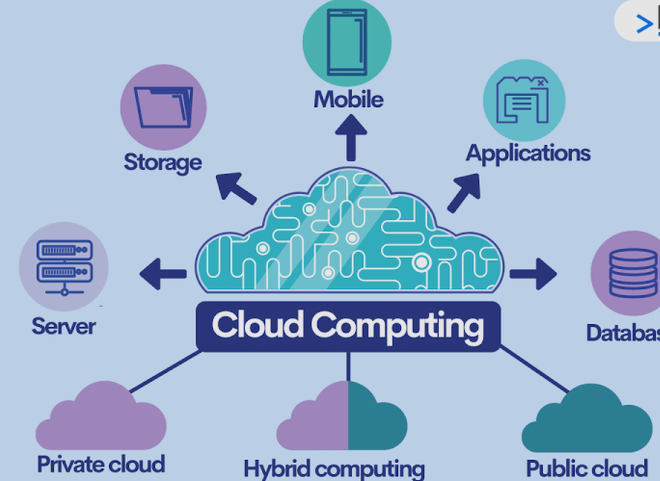
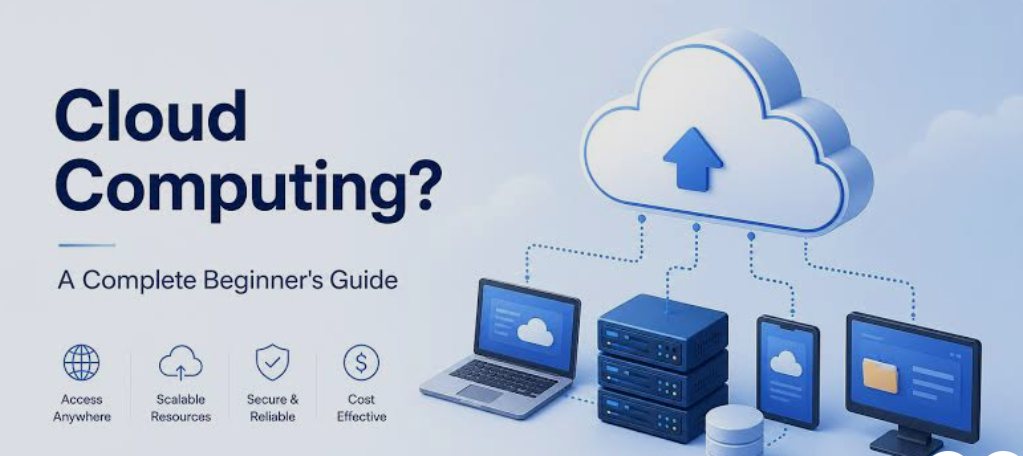
Cloud computing is a broader concept. It refers to delivering computing resources and services over the internet.
These resources can include:
- Virtual servers
- Processing power
- Memory
- Databases
- Networking
- Operating systems
- Software
- Development platforms
- Artificial intelligence services
- Data analytics tools
- Security services
Instead of buying and maintaining physical hardware, users can rent computing resources from a cloud provider.
For example, a business developing a web application may need servers to run its website. Rather than purchasing physical servers, the company can use cloud computing infrastructure and pay for the resources it consumes.
How Does Cloud Computing Work?
Cloud computing relies on large networks of physical servers located in data centers.
Cloud providers operate these data centers and use virtualization, automation, networking, storage, and management software to provide computing resources to customers.
A customer can request a virtual machine, database, application environment, or other resource. The cloud provider allocates the necessary infrastructure.
One of the biggest advantages is flexibility.
A business may start with a small amount of computing power and increase its resources as demand grows. If traffic decreases, it can reduce its usage.
This makes cloud computing particularly useful for websites, applications, online services, software companies, and organizations with changing workloads.
Cloud Storage vs Cloud Computing: The Basic Difference
The simplest way to understand the difference is:
Cloud storage is primarily about storing data, while cloud computing is about using remote computing resources to perform tasks.
Think of cloud storage as a digital warehouse.
You put your files inside the warehouse and retrieve them whenever necessary.
Cloud computing is more like renting a complete computer system or technology infrastructure remotely.
You can use processing power, memory, databases, software environments, and other resources without owning the physical hardware.
Key Differences Between Cloud Storage and Cloud Computing
1. Primary Purpose
The main purpose of cloud storage is to store, manage, synchronize, and access data.
Cloud computing is designed to process data, run applications, perform calculations, host services, and provide computing resources.
2. Main Resource
Cloud storage primarily provides storage capacity.
Cloud computing can provide many different resources, including:
- CPU
- RAM
- Storage
- Databases
- Networking
- Virtual machines
- Software platforms
3. Typical Users
Cloud storage is commonly used by individuals, students, photographers, businesses, and organizations that need convenient file storage.
Cloud computing is widely used by developers, technology companies, startups, enterprises, researchers, and organizations running applications or digital services.
4. Examples of Activities
Uploading a family photo to online storage is cloud storage.
Running an online shopping website on remote servers is cloud computing.
Backing up your computer is cloud storage.
Processing millions of transactions through remote servers is cloud computing.
5. Infrastructure
Cloud storage infrastructure focuses heavily on storage systems, data redundancy, file management, and data availability.
Cloud computing infrastructure includes servers, virtual machines, networking, databases, storage, applications, and other computing components.
Examples of Cloud Storage
Cloud storage is used in many everyday situations.
Personal File Storage
People use cloud storage to keep documents, photos, videos, and other personal files.
Instead of keeping everything on one device, users can access their information from multiple devices.
Smartphone Backup
Cloud storage can be used to back up photos, contacts, videos, and other important information.
This becomes particularly useful if a phone is lost, damaged, or replaced.
Business File Sharing
Companies can store documents in the cloud and allow authorized employees to access them.
This can make remote collaboration easier because employees do not always need to be connected to the same physical office network.
Website Backups
Website owners can store database backups, media files, configuration backups, and other important website information in cloud storage.
If something goes wrong with the primary website server, backups can help with recovery.
Examples of Cloud Computing
Cloud computing has an even wider range of applications.
Website Hosting
Businesses can host websites and web applications on cloud computing infrastructure.
The cloud environment can provide processing power, memory, networking, databases, and storage required to operate the website.
Mobile Applications
Many mobile applications rely on cloud servers.
The mobile app may run on a smartphone while authentication, databases, notifications, analytics, or other functions are handled by cloud-based infrastructure.
Video Streaming
Streaming platforms need significant computing infrastructure to process, store, distribute, and deliver content to users.
Cloud computing can provide scalable infrastructure for these workloads.
Artificial Intelligence
AI applications often require significant computing resources.
Cloud computing allows organizations to access powerful processors and specialized hardware without purchasing and maintaining all of the physical infrastructure themselves.
Data Analytics
Companies can use cloud computing to process large datasets.
Businesses may analyze customer behavior, sales information, website traffic, financial data, or operational information using cloud-based computing resources.
Is Cloud Storage Part of Cloud Computing?
Yes. Cloud storage is commonly considered one component or service within the broader cloud computing ecosystem.
Cloud computing includes many types of services, and storage is one of them.
However, the terms should not be treated as interchangeable.
For example, a company may use cloud storage simply to keep backups. It may not need to run applications or perform complex computations.
On the other hand, an application hosted in the cloud may use several cloud services simultaneously, including computing, databases, networking, and cloud storage.
Benefits of Cloud Storage
Cloud storage provides several important advantages.
Easy Accessibility
Users can access their files from different devices as long as they have the necessary connection and permissions.
Automatic Synchronization
Many services can automatically synchronize files between devices.
For example, a document edited on one device can become available on another device.
Backup and Recovery
Cloud storage can provide an additional location for important data.
This can reduce the risk of losing everything when a local device fails.
Easy File Sharing
Users can share files or folders with other people without physically transferring storage devices.
Scalability
Cloud storage makes it easier to increase storage capacity when requirements grow.
A business does not necessarily need to purchase physical storage hardware every time it needs additional capacity.
Benefits of Cloud Computing
Cloud computing provides several advantages beyond storage.
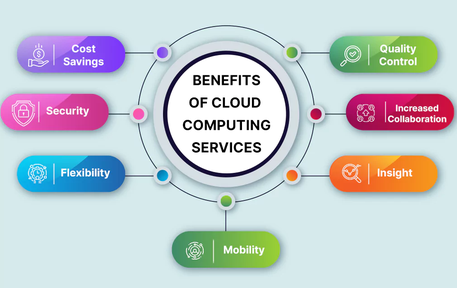
Scalability
Cloud resources can often be increased or decreased according to demand.
A website receiving a sudden increase in visitors may require more computing resources than it normally uses.
Lower Hardware Requirements
Businesses do not necessarily need to purchase large amounts of physical server hardware.
Instead, they can rent infrastructure from cloud providers.
Faster Deployment
Developers can often create servers, databases, and application environments much faster than purchasing and configuring physical infrastructure.
Global Availability
Cloud infrastructure can allow businesses to deploy applications closer to users in different geographical regions.
Automation
Many cloud environments provide tools for automated deployment, monitoring, scaling, backups, and resource management.
Flexible Pricing
Many cloud services use usage-based pricing.
This can allow organizations to pay according to their resource consumption instead of making a large upfront hardware investment.
Cloud Storage vs Local Storage
Cloud storage is different from traditional local storage.
Local storage includes:
- Hard drives
- SSDs
- USB drives
- Memory cards
- Local network storage
Local storage can be fast and available without an internet connection. However, physical devices can fail, become damaged, or be lost.
Cloud storage moves the storage infrastructure to remote data centers.
This provides accessibility and redundancy but introduces a dependency on internet connectivity and the cloud provider.
In many situations, using both local and cloud storage provides a stronger overall strategy.
Cloud Computing vs Traditional Computing
Traditional computing usually requires organizations to own or directly manage physical infrastructure.
A company might purchase:
- Physical servers
- Storage systems
- Networking equipment
- Backup hardware
- Cooling systems
- Power infrastructure
The company is responsible for maintaining this infrastructure.
With cloud computing, much of the physical infrastructure is operated by the cloud provider.
The customer generally manages the services and resources it uses, while the provider manages the underlying physical environment.
This can significantly change how businesses plan and operate their technology infrastructure.
Security: Cloud Storage vs Cloud Computing
Security is important for both cloud storage and cloud computing.
Cloud storage providers typically offer security features such as:
- Encryption
- Authentication
- Access permissions
- Activity monitoring
- Backup systems
- Version management
Cloud computing platforms can provide additional security controls for servers, networks, applications, databases, identities, and workloads.
However, using a cloud service does not automatically make data or applications completely secure.
Users and organizations still need to:
- Use strong passwords
- Enable multi-factor authentication
- Control permissions
- Update applications
- Protect access credentials
- Monitor suspicious activity
- Maintain appropriate backups
A major security principle in cloud environments is the shared responsibility model. The cloud provider protects parts of the infrastructure, while customers remain responsible for securing their accounts, configurations, applications, and data according to the service being used.
Cost Differences
Cloud storage and cloud computing can have very different pricing structures.
Cloud storage costs are generally associated with the amount of data stored, data transfer, operations, and additional features.
Cloud computing costs can involve:
- CPU usage
- Memory
- Server runtime
- Storage
- Database usage
- Network traffic
- Specialized hardware
- Software services
For example, storing 500 GB of files may have a relatively predictable cost.
Running a high-traffic application can have a much more complex cost because the application may consume computing resources continuously.
Businesses should therefore understand pricing before moving large workloads to the cloud.
When Should You Use Cloud Storage?
Cloud storage is usually appropriate when your main requirement is storing and accessing data.
You may want cloud storage if you need to:
- Back up important files
- Store photos and videos
- Share documents
- Synchronize files
- Store website backups
- Archive information
- Access files from different devices
For an individual user who simply wants a safe place for personal documents and photos, cloud storage may be enough.
When Should You Use Cloud Computing?
Cloud computing becomes more relevant when you need processing power or infrastructure to run something.
You may need cloud computing if you want to:
- Host a website
- Run a web application
- Operate a database
- Process large datasets
- Build AI applications
- Run business software
- Develop and test applications
- Run automated workloads
- Scale an online service
Developers and businesses often use multiple cloud services together rather than relying on only one.
Can You Use Cloud Storage and Cloud Computing Together?
Absolutely.
In fact, many modern applications use both.
Imagine an online photo application.
The application could use cloud computing to:
- Run the website and mobile application.
- Process uploaded images.
- Authenticate users.
- Manage databases.
- Generate thumbnails.
At the same time, cloud storage could be used to:
- Store original photos.
- Store thumbnails.
- Keep backups.
- Store user files.
In this example, computing resources perform the work while storage resources hold the data.
A Simple Real-World Example
Suppose you operate an online technology website.
You could use cloud computing to run:
- WordPress or another content management system
- Web server
- Database
- Caching system
- Security tools
You could then use cloud storage to keep:
- Website backups
- Images
- Videos
- Documents
- Database backup files
The two services work together but have different jobs.
The cloud computing infrastructure runs the website, while cloud storage stores the information.
Cloud Storage vs Cloud Computing: Comparison Table
| Feature | Cloud Storage | Cloud Computing |
|---|---|---|
| Main purpose | Store data | Run applications and workloads |
| Primary resource | Storage | CPU, RAM, servers, databases, networking, and more |
| Main function | Save and retrieve files | Process and execute tasks |
| Common users | Individuals and businesses | Developers and businesses |
| Example use | File backup | Website hosting |
| Scalability | Storage capacity | Computing resources |
| Data access | Files and stored information | Applications, services, and workloads |
| Hardware ownership | Usually handled by provider | Usually handled by provider |
| Internet dependency | Usually required for remote access | Usually required for cloud access |
| Relationship | A cloud service | A broader technology model |
Advantages and Disadvantages of Cloud Storage
Advantages
Cloud storage is convenient, scalable, and accessible. It can simplify backups and file sharing while reducing dependence on individual physical devices.
It is also useful for remote work because authorized users can access files from different locations.
Disadvantages
Cloud storage depends on the service provider and internet connectivity.
Storage costs can also increase as the amount of stored data grows.
Privacy and security must also be considered, especially when storing confidential business information.
Advantages and Disadvantages of Cloud Computing
Advantages
Cloud computing provides flexible infrastructure, scalability, faster deployment, and access to advanced technologies.
It can also reduce the need for businesses to purchase and maintain large physical data centers.
Disadvantages
Cloud computing can become expensive if resources are not monitored properly.
It can also be technically complex, especially for organizations managing large applications.
Configuration mistakes can create security problems, and businesses may become dependent on a particular cloud provider.
Which One Is Better?
There is no universal winner because cloud storage and cloud computing solve different problems.
If your main goal is to save and access files, cloud storage is the better solution.
If you need to run applications, websites, databases, or complex workloads, cloud computing is more appropriate.
For many businesses, the best solution is to use both.
Cloud storage handles the data, while cloud computing provides the infrastructure needed to process and use that data.
The Future of Cloud Storage and Cloud Computing
Both technologies are expected to remain important as businesses continue moving their digital operations to cloud-based infrastructure.
The growth of artificial intelligence, machine learning, big data, remote work, software-as-a-service applications, and digital services is increasing demand for scalable computing and storage.
Cloud providers are also developing more specialized services for AI, analytics, cybersecurity, databases, and application development.
As these technologies evolve, the difference between individual cloud services may become less visible to everyday users. However, the fundamental distinction will remain important: storage holds data, while computing provides resources for processing and running workloads.
Final Thoughts
Cloud storage and cloud computing are closely connected but serve different purposes.
Cloud storage is primarily a way to store, protect, synchronize, and access data through remote infrastructure. Cloud computing is a broader model that provides computing resources such as servers, processing power, databases, networking, and software through the internet.
The easiest way to remember the difference is to think of cloud storage as a digital warehouse and cloud computing as a remote technology infrastructure that performs work.
Individuals may only need cloud storage for backups and file access, while businesses and developers may use cloud computing to host applications, process information, operate databases, and scale digital services.
Understanding this difference can help you choose the right cloud services for your personal or business requirements. In many modern systems, the two work together: cloud computing processes the workload, while cloud storage keeps the data available for that workload.